Updates
Release notes and product updates in a timeline format.
Bug fixes & API improvements 🎉
A small update to wrap up the year with some polish.
- API stability improvements — Fixed edge cases in rate limiting and error responses
- Webhook reliability — Improved retry logic for failed webhook deliveries
- Dashboard performance — Minor optimizations for faster page loads
- Fixed an issue where some crawl exports could timeout on large sites
Happy New Year from the SEO Crawler team! We're excited for what 2026 has in store. 🚀
Command Palette
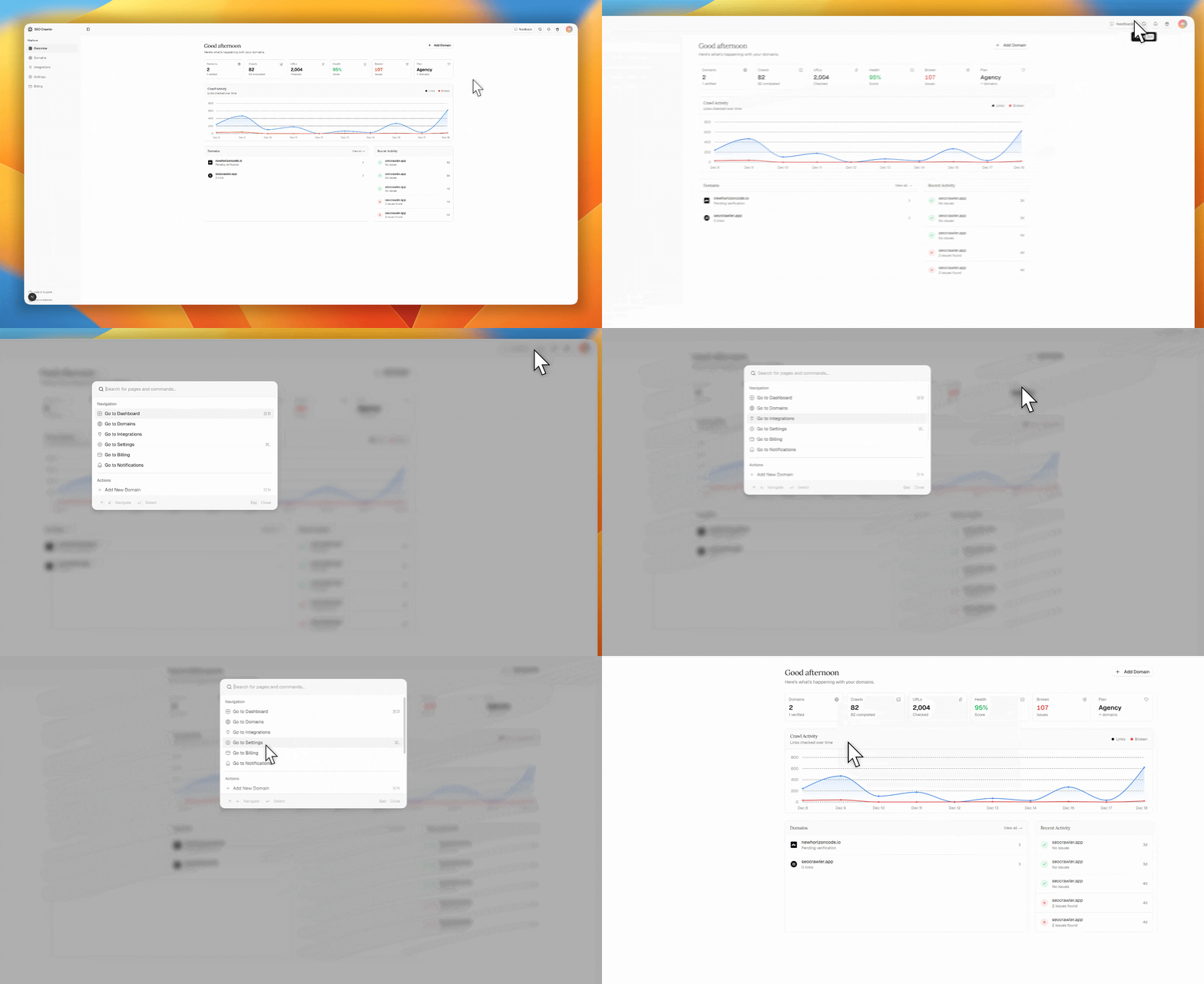
Quickly navigate anywhere in the app with the new Command Palette.
- Press ⌘K (Mac) or Ctrl+K (Windows/Linux) to open
- Navigate to any page instantly (Dashboard, Domains, Settings, etc.)
- Run actions like adding a domain or creating a support ticket
- Switch themes between Light, Dark, or System mode
- Keyboard-driven workflow with arrow keys and Enter to select
Click the search icon in the header or use the keyboard shortcut to get started.
Crawler engine upgrade
Crawls are now more complete and reliable thanks to a major engine upgrade:
- Persistent URL frontier (no dropped URLs between batches)
- robots.txt compliance (disallow rules are respected)
- Sitemap seeding (when Sitemap Analysis is enabled)
- Stronger URL dedupe/canonicalization to reduce duplicates
- nofollow handling (meta robots + rel=nofollow links)
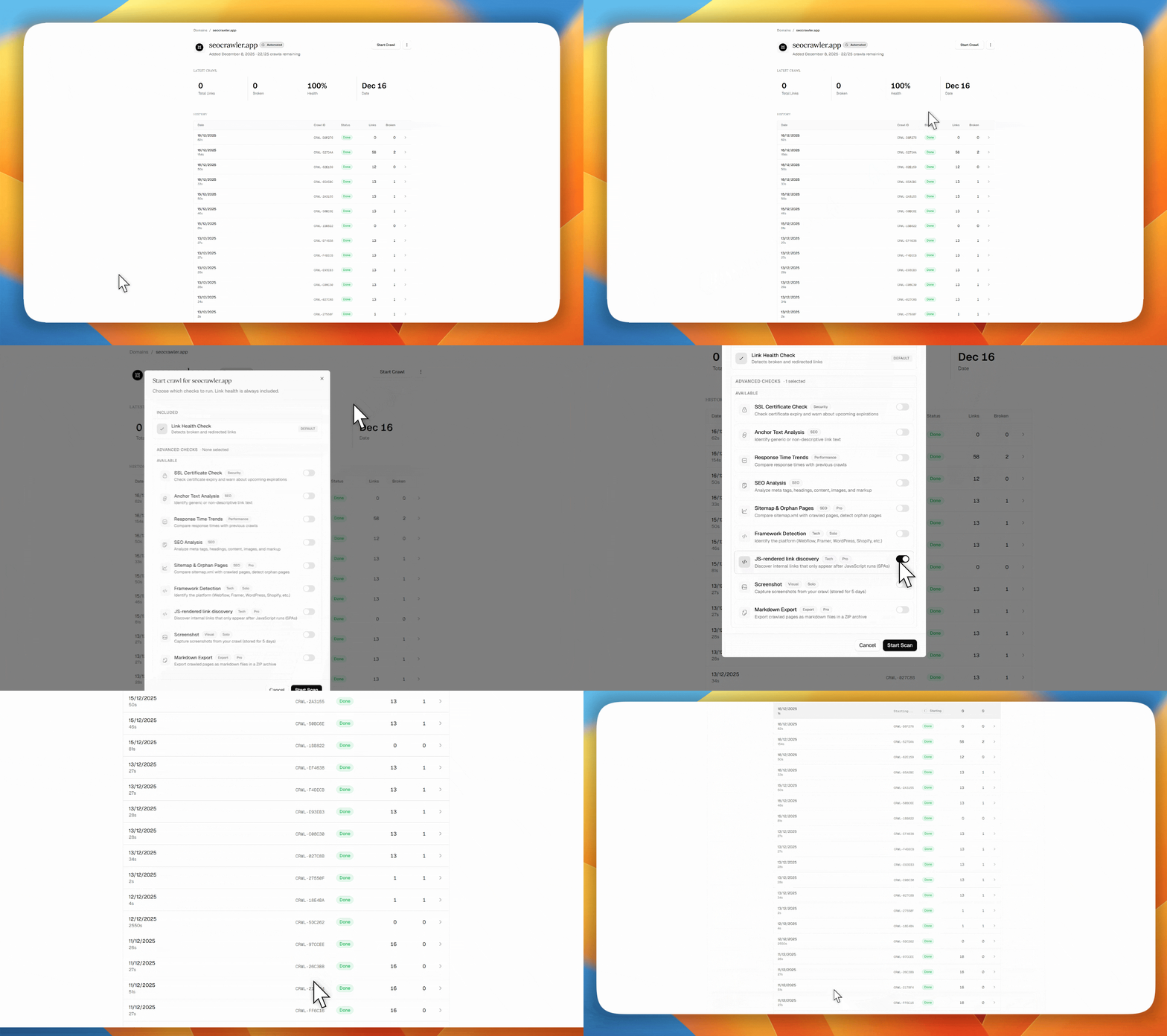
- JS-rendered link discovery (Pro+) for SPA sites
Turn on JS-rendered link discovery in the Start crawl modal (Pro/Agency).
Full-page crawl screenshots
You can now capture a full-page PNG screenshot of your crawl's start URL.
- Turn it on in the Start crawl modal (Screenshot toggle)
- View it in crawl results via the 3-dot menu → Reveal screenshot
- Download as PNG or open in a new tab
Screenshots are stored for 5 days and are available on Solo+ plans.

Markdown Export Support
You can now export your website crawl results as Markdown files.
- Include crawl data in documentation
- Share results in Markdown-compatible platforms (GitHub, Notion, etc.)
- Process and transform results with your own tools
- Create custom reports using Markdown syntax
Available alongside PDF and CSV exports in the crawl results dashboard.
Version 1.0.0 — Initial Release
SEO Crawler is live — your complete link health monitoring solution.
Link Health
- Broken Link Detection — Find 404s, timeouts, and connection errors across your entire site
- Redirect Chain Analysis — Identify redirect chains and loops that slow down your site
- Response Time Tracking — Monitor page response times and spot performance issues
Site Structure
- Orphan Page Detection — Discover pages not linked from anywhere on your site
- Sitemap Analysis — Find URLs missing from your sitemap
- Internal Link Mapping — Visualize how your pages connect
SEO & Security
- SSL Certificate Monitoring — Track certificate expiration with automatic alerts
- SEO Analysis — Check meta titles, descriptions, headings, and image alt text
- Anchor Text Analysis — Evaluate link text quality and find over-optimization
AI & Automation
- AI-Powered Review — Get smart recommendations to fix issues automatically
- Scheduled Crawls — Automate monitoring with daily, weekly, or custom schedules
- Email Notifications — Instant alerts when new issues are detected
Integrations & API
- Webhook Integrations — Real-time notifications to your own endpoints
- REST API — Full programmatic access for Agency plans
- Zapier & Make — Connect with thousands of apps (coming soon)
Reporting & Export
- White-Label Reports — Custom branding for agencies
- PDF & CSV Export — Share results with clients and stakeholders
- Shareable Links — Public report URLs with optional password protection